Construction Monitoring Camera Timelapse: The Full Workflow
Construction sites change every day, but many of the most important changes happen slowly. Foundations are completed, structures rise, façades close and different trades move through the site over months or…
Part of the series · Long-Term Construction Timelapse GuideConstruction Timelapse for Long-Term Outdoor Projects: The Professional Guide (Months to Years)
Quick answer
A construction monitoring camera timelapse is created by capturing still images at regular intervals from a fixed viewpoint and rendering them into a video that shows project progress. For many sites, one image every 10 to 15 minutes during working hours is enough. Reliable results depend on the full workflow of capture, transfer, storage, monitoring, and rendering, not the camera alone.
Construction sites change every day, but many of the most important changes happen slowly. Foundations are completed, structures rise, façades close and different trades move through the site over months or years. For construction companies, infrastructure developers, engineering firms and monitoring service providers, a construction monitoring camera timelapse turns that gradual progress into a clear visual record.
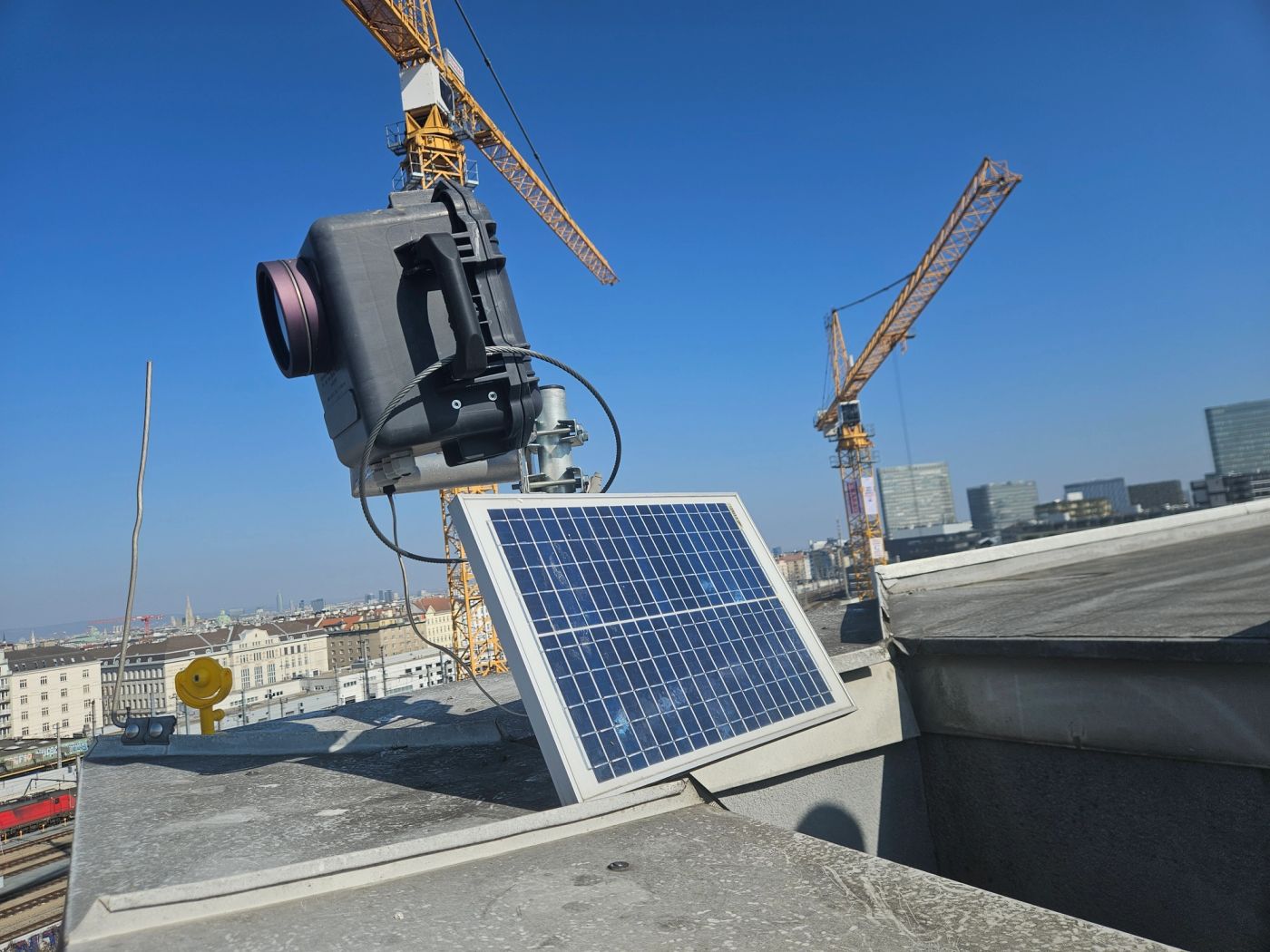
Construction monitoring cameras are often used to provide remote visibility, document milestones, support stakeholder communication and create a project archive. When these cameras capture images at regular intervals, the resulting image sequence can be turned into a professional timelapse video.
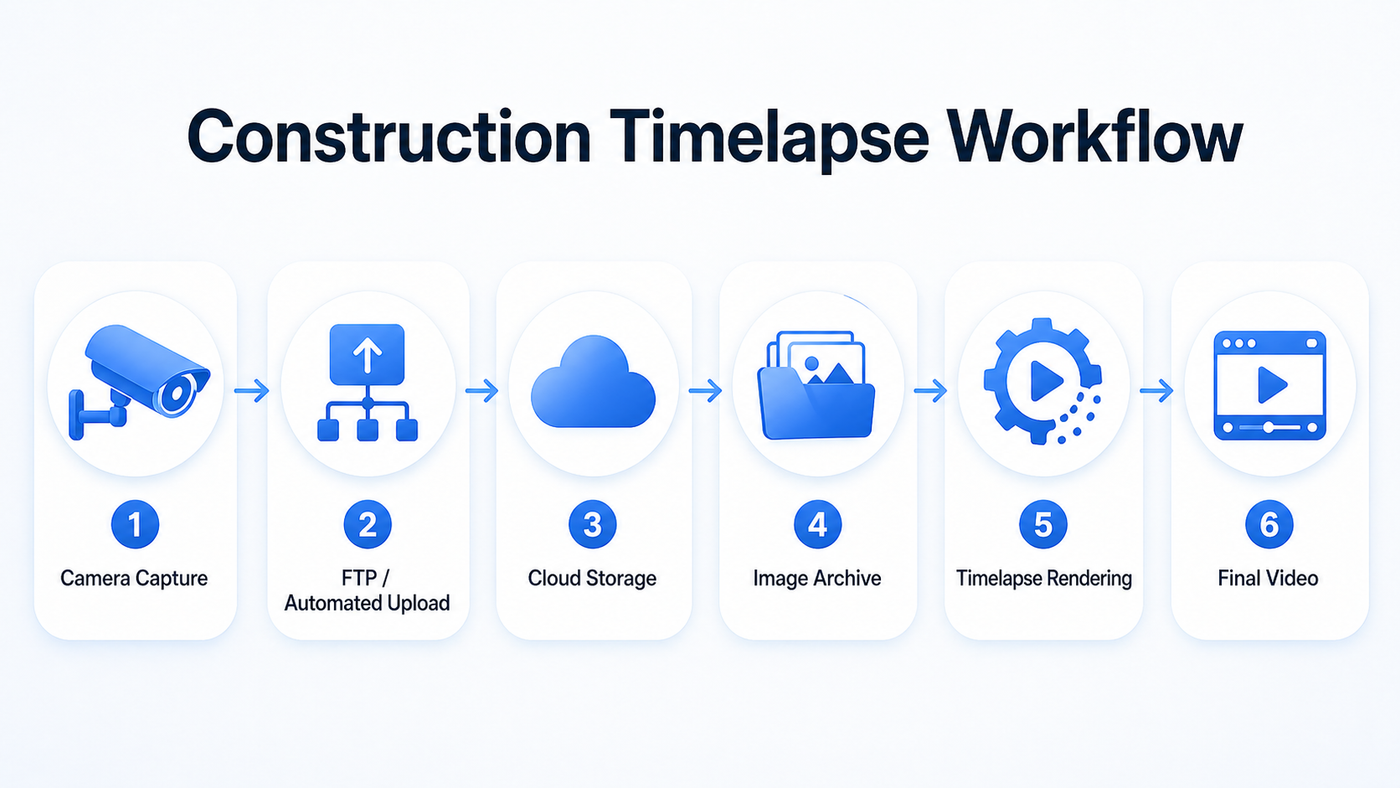
However, long-term construction timelapse is not just a camera feature. A reliable result depends on a complete workflow: image capture, transfer, storage, monitoring, organization, and rendering. The camera is important, but it is only one part of the system.
For a broader view of long-term outdoor project planning, see our guide to construction timelapse for long-term outdoor projects.
How Construction Monitoring Cameras Capture Images
A construction progress camera usually supports either continuous video recording or interval-based image capture. For long-term timelapse, interval-based snapshots are usually the more practical approach.
Instead of recording video continuously, the camera captures a still image at a defined interval. This creates a structured image sequence that can later be reviewed, filtered, processed and rendered into one or more videos.
Interval-Based Snapshot Capture
Interval capture works well for construction because most visible progress does not need second-by-second recording. A building may change significantly over a day, but a full video stream is usually unnecessary for a professional progress timelapse.
A camera mounted on a mast, crane, neighboring building, site office, or fixed pole can capture regular images from the same viewpoint. Over time, those images become a chronological record of the project. For projects that use action cameras instead of fixed IP cameras, see our GoPro construction timelapse long-term setup guide.
This method gives the project team more control than an automatically generated in-camera video. Individual images can be checked, excluded, reorganized, or used for different versions of the final video.
Typical Capture Intervals in Construction Projects
There is no single ideal capture interval for every site. The right interval depends on the project type, the pace of work, the camera angle, and the intended use of the final video.
For many construction projects, one image every 10 to 15 minutes during working hours is enough to show meaningful progress without creating unnecessary file volume. Faster phases, such as demolition, steel erection, façade installation, or crane activity, may justify shorter intervals. Slower infrastructure or civil engineering projects may work well with longer intervals.
A professional jobsite monitoring camera timelapse workflow should allow the interval to match the project phase instead of locking the entire project into one fixed setting.
How Images Are Transferred from the Camera
Capturing images is only useful if those images are reliably moved away from the camera and into a managed system. On a long-term construction site, manual file retrieval is rarely practical.
Cameras may be difficult to access, site layouts change and weather can delay access. For projects lasting several months or years, automated transfer is essential.
FTP Upload
Many construction monitoring cameras support FTP upload. In this workflow, the camera captures an image and sends it automatically to a remote server.
FTP is widely used because it is supported by many IP cameras. It allows the camera to act as the capture device while the receiving system handles organization, monitoring and later processing. For a practical setup perspective, see our guide on how to turn an IP camera into a construction timelapse system.
For a deeper technical explanation of this part of the workflow, see our guide to camera FTP upload for long-term projects.
Automated Image Transfer Workflows
FTP is one option, but automated transfer can also happen through cloud APIs, cellular routers, local network storage, or dedicated upload systems. The exact method is less important than the operational result: images should leave the camera automatically and arrive in a central location.
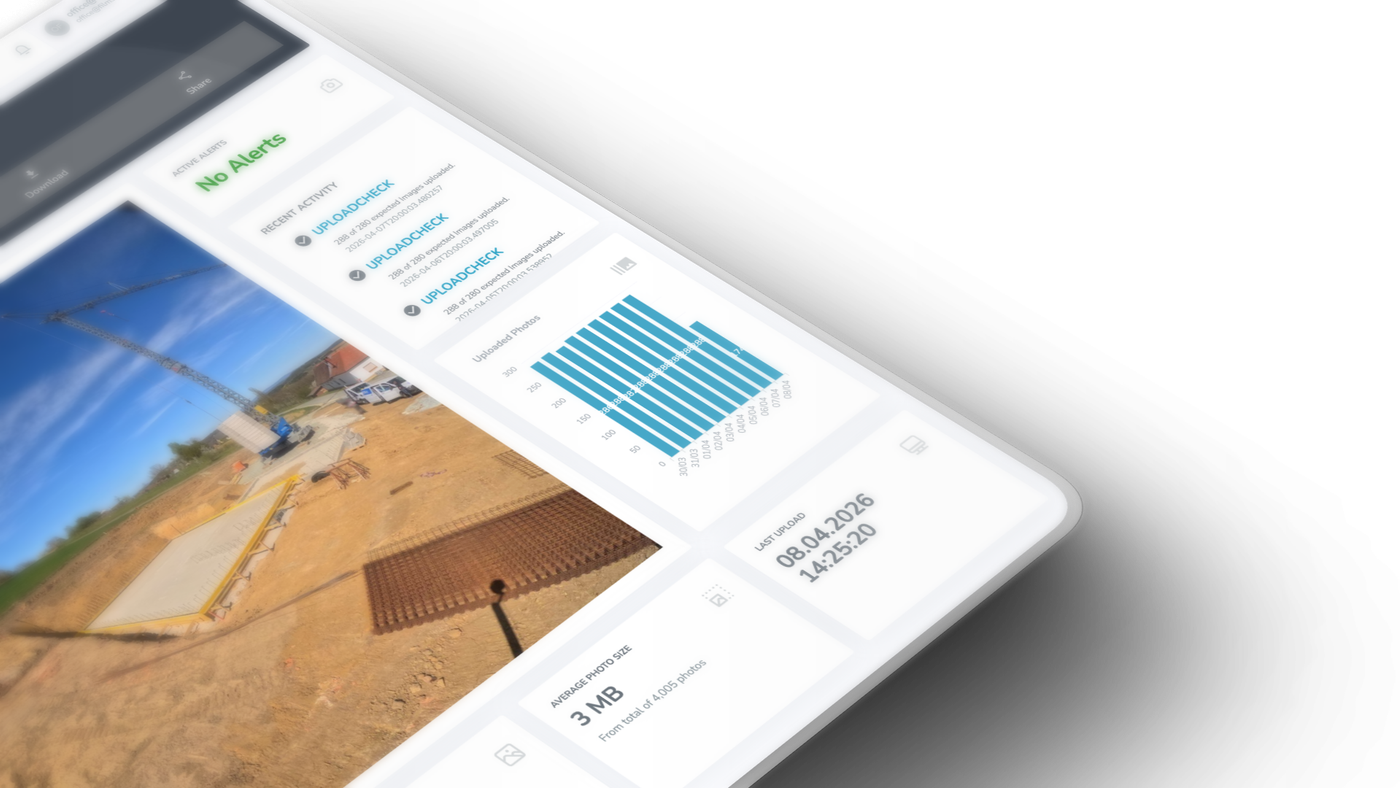
A reliable workflow should show whether the camera is still uploading, when the latest image was received and whether expected files are missing. Without this visibility, a camera can fail silently.
Consistent File Naming and Timestamps
Consistent file naming is essential. Each image should have a reliable timestamp, either in the filename, metadata or the receiving platform.
This matters because upload time and capture time are not always the same. If a connection drops temporarily, images may arrive later than they were captured. A good timestamp allows the system to place each frame in the correct order.
A long-term construction timelapse workflow may later need monthly videos, milestone videos, stakeholder updates, or final project films. All of those outputs depend on the same image archive being correctly ordered.
Organizing Large Image Datasets Over Long Periods
A single camera can produce tens of thousands of images during a long construction project. With multiple cameras, the archive can grow quickly.
For professional work, images need to be organized by project, camera, date, and capture sequence.
Project Structure and Folder Organization
A practical structure starts with the project, then separates images by camera or viewpoint. For example, a large site may have a north view, south view, crane view, access road view, or interior view.
Folder organization should support both automated processing and human review. Images may be grouped by camera, date, month, or capture sequence. The important point is that the structure remains predictable.
It is also useful to separate raw images, selected images, preview videos, and final exports. The original image archive should remain intact even if later editing decisions change.
Handling Thousands of Images
Long-term construction images are not all equally useful. Some frames may be affected by rain, fog, dirt, glare, darkness, temporary obstructions, or site equipment blocking the view.
A professional workflow should make it possible to filter unsuitable frames without deleting the original archive. This preserves the documentation record while still allowing clean video production.
Construction Monitoring Camera Timelapse Workflow: From Capture to Final Video
A timelapse video is created by playing still images back as video frames. For example, if one image becomes one frame in a 25 frames-per-second video, 250 images create 10 seconds of video.
How Timelapse Videos Are Generated
Before rendering, images may need to be sorted, resized, cropped, stabilized, filtered, color adjusted, or selected by date range. The same image archive can be used to create different videos for different purposes.
A project manager may need a short weekly progress video. A developer may want a monthly update for investors. A marketing team may need a polished final video after project completion.
The value comes from keeping the original image sequence available. The video is only one output. The image archive is the long-term asset.
Why Cloud-Based Rendering Is More Flexible Than In-Camera Processing
Cloud-based rendering is usually more flexible than relying on in-camera timelapse processing. When images are stored externally, videos can be generated later from selected date ranges, filtered frames, or specific project phases.
This is useful when stakeholders request different versions of the same project: a short executive summary, a detailed technical progress video, a social media version, or a final handover film.
A camera-generated video rarely offers that level of flexibility.
Why Built-In Timelapse Features Are Often Not Suitable for Long-Term Projects
Many cameras include a built-in timelapse feature. For short-term use, this can be convenient. For professional construction monitoring, it often creates limitations.
Built-in timelapse modes usually make important decisions too early. The camera may create a finished video internally, with limited control over frame selection, date range, playback speed or output format.
That can be a problem when the project team later wants to remove bad weather days, focus on a specific phase, or create a different version for another audience.
There is also a data risk. If images are stored only inside the camera or on a local memory card, the archive is vulnerable. The camera can fail, be moved, lose power, be damaged, or overwrite older files. On a construction site, a missing week during a major project phase cannot be recreated later.
A built-in timelapse file is usually a final output. If the original images are not available, the project team may not be able to re-render the video later.
Monitoring Camera Health in Long-Term Deployments
A construction monitoring camera can only create a reliable timelapse if it keeps capturing and transferring images throughout the project. This is why camera health monitoring is part of the workflow, not an optional add-on.
Failures are not always obvious. A camera may stop uploading while still appearing to be installed correctly. A router may lose connection. A power supply may fail. A lens may become dirty. A camera may shift slightly due to wind or site activity.
A good workflow should detect when expected images stop arriving. If the system normally receives an image every 10 minutes, a longer gap should become visible quickly.
For a deeper look at this operational layer, see our guide to remote timelapse monitoring for long-term construction projects.
Continuous capture does not mean that no interruption will ever happen. It means the workflow is designed to reduce interruptions and detect them early. The system should make it easy to verify recent images, confirm upload activity, and identify missing periods.
Common Challenges in Real-World Construction Environments
Construction sites are demanding environments. Even a well-chosen camera can struggle if the surrounding system is not planned correctly.
Power is one of the most common failure points. Temporary site power can be moved, disconnected, overloaded, or switched off. Solar systems can be affected by weather, dirt, shading, and winter conditions.
For a deeper look at this topic, see our guide to timelapse camera power supply for long-term construction projects.
Connectivity can also change over time. Cellular signal may weaken as structures rise. WiFi may become unreliable. Wired connections may be interrupted by site work. A reliable workflow should tolerate temporary connection problems where possible and make upload gaps visible when they occur.
Weather, dust, condensation, wind, vibration, and changing sunlight can all affect image quality. Camera placement should consider not only the current view, but also how the site will evolve.
For physical setup considerations, see our guide to building an outdoor timelapse camera setup for harsh conditions.
Best Practices for Reliable Construction Timelapse Workflows
A reliable construction monitoring camera timelapse workflow should be planned as a long-term operating system, not as a one-time camera setup.
The camera should capture images. The storage system should preserve them. The rendering system should create videos from selected image sequences. This separation reduces risk and improves flexibility.
Data integrity is equally important. Images should be complete, correctly ordered, safely stored and recoverable. This requires reliable upload, timestamp handling, backup logic, and non-destructive editing.
Before deployment, teams should define the capture interval, transfer method, power strategy, connectivity plan, monitoring process, file structure, and expected video outputs.
For a detailed overview of common failure points, see our guide to construction timelapse problems and how to avoid them.
Summary
A construction monitoring camera timelapse is created by capturing images at regular intervals and turning those images into a video that shows project progress over time. But for long-term construction projects, the camera alone is not enough.
Professional results depend on the full workflow: interval capture, automated transfer, consistent timestamps, structured storage, remote monitoring, and flexible rendering.
Built-in camera timelapse features may be convenient for simple cases, but they are often too limited for projects lasting several months or years. Construction companies, infrastructure developers, engineering firms and monitoring service providers need workflows that preserve the original image archive, allow re-rendering, detect failures, and handle real-world site conditions.
A reliable jobsite monitoring camera timelapse system should therefore be planned as a complete process. The camera captures the progress, but the workflow protects it, organizes it, and turns it into professional visual documentation.
Frequently asked questions
- What interval should a construction monitoring camera capture images at?
- For many construction projects, one image every 10 to 15 minutes during working hours shows meaningful progress without unnecessary file volume. Faster phases such as demolition, steel erection, façade installation, or crane activity can justify shorter intervals, while slower infrastructure or civil engineering projects may work with longer ones. A professional workflow lets the interval match the project phase instead of locking in one fixed setting.
- How many images do I need for a construction timelapse video?
- A timelapse video is created by playing still images back as video frames. If one image becomes one frame in a 25 frames-per-second video, 250 images create 10 seconds of video. Long projects generate tens of thousands of images per camera, so the final edit rarely uses every frame; sequences are selected by date range or project phase and paced intentionally.
- Why shouldn't I rely on the camera's built-in timelapse feature?
- Built-in timelapse modes make important decisions too early: the camera creates a finished video with limited control over frame selection, date range, playback speed, and output format. If images are stored only in the camera or on a memory card, the archive is also vulnerable to failure, damage, or overwriting. Without the original images, the video usually cannot be re-rendered later for different audiences.
- How do images get from the camera into storage?
- On long-term sites, manual file retrieval is rarely practical, so automated transfer is essential. Many construction cameras support FTP upload, where each captured image is sent automatically to a remote server; alternatives include cloud APIs, cellular routers, local network storage, or dedicated upload systems. The method matters less than the result: images should leave the camera automatically and arrive in a central, monitored location.
- How do I know if my construction camera has stopped working?
- Failures are often silent: a camera can stop uploading while still looking correctly installed, a router can lose connection, power can fail, a lens can get dirty, or the camera can shift in the wind. A good workflow detects when expected images stop arriving; if the system normally receives an image every 10 minutes, a longer gap should become visible quickly and trigger a check.
- Can I remove bad-weather or obstructed frames without losing documentation?
- Yes. Long-term archives always contain frames affected by rain, fog, dirt, glare, darkness, or equipment blocking the view. A professional workflow filters unsuitable frames for the video without deleting them, so the original image archive stays intact as the project record. The video is only one output; the complete, correctly ordered archive is the long-term asset.
Planning a long-term construction timelapse?
Discover the system built for multi-month and multi-year construction deployments.
Explore the Construction Timelapse SystemConnect your own camera
Turn your FTP/IP camera into a timelapse system — start for free.
Step-by-step setup guides: Reolink RLC-510WA · Bixion

