Camera FTP Upload for Long-Term Projects: How Reliable Image Workflows Actually Work
In long-term visual documentation, a camera FTP upload workflow is one of the most practical ways to move images from field hardware into a central system.
Part of the series · Long-Term Construction Timelapse GuideConstruction Timelapse for Long-Term Outdoor Projects: The Professional Guide (Months to Years)
Quick answer
Camera FTP upload lets a network camera send scheduled image snapshots automatically to a remote server using the File Transfer Protocol. The camera is configured with a server address, username, password, destination path, and upload rule, then pushes each captured JPEG to that endpoint. In long-term projects, FTP is only the intake step; organization, monitoring, and processing must happen behind it.
In long-term visual documentation, a camera FTP upload workflow is one of the most practical ways to move images from field hardware into a central system. It is widely used in construction, infrastructure and industrial documentation because many network cameras can generate image snapshots on a schedule and send them automatically to a remote destination.
That simplicity is also why FTP-based workflows are often misunderstood. Uploading files from a camera is not the same as having a dependable production system. To see where FTP upload fits into the wider system of capture, storage, monitoring, and rendering, read our guide to the complete construction monitoring camera timelapse workflow.
In real deployments, especially on projects that run for months or years, FTP is only one layer of the workflow. Reliability depends just as much on naming consistency, timestamp handling, monitoring, recovery processes and long-term organization.
This is especially relevant in construction timelapse for long-term outdoor projects, where continuity matters more than one successful test day. A missing week of images cannot usually be recreated later.
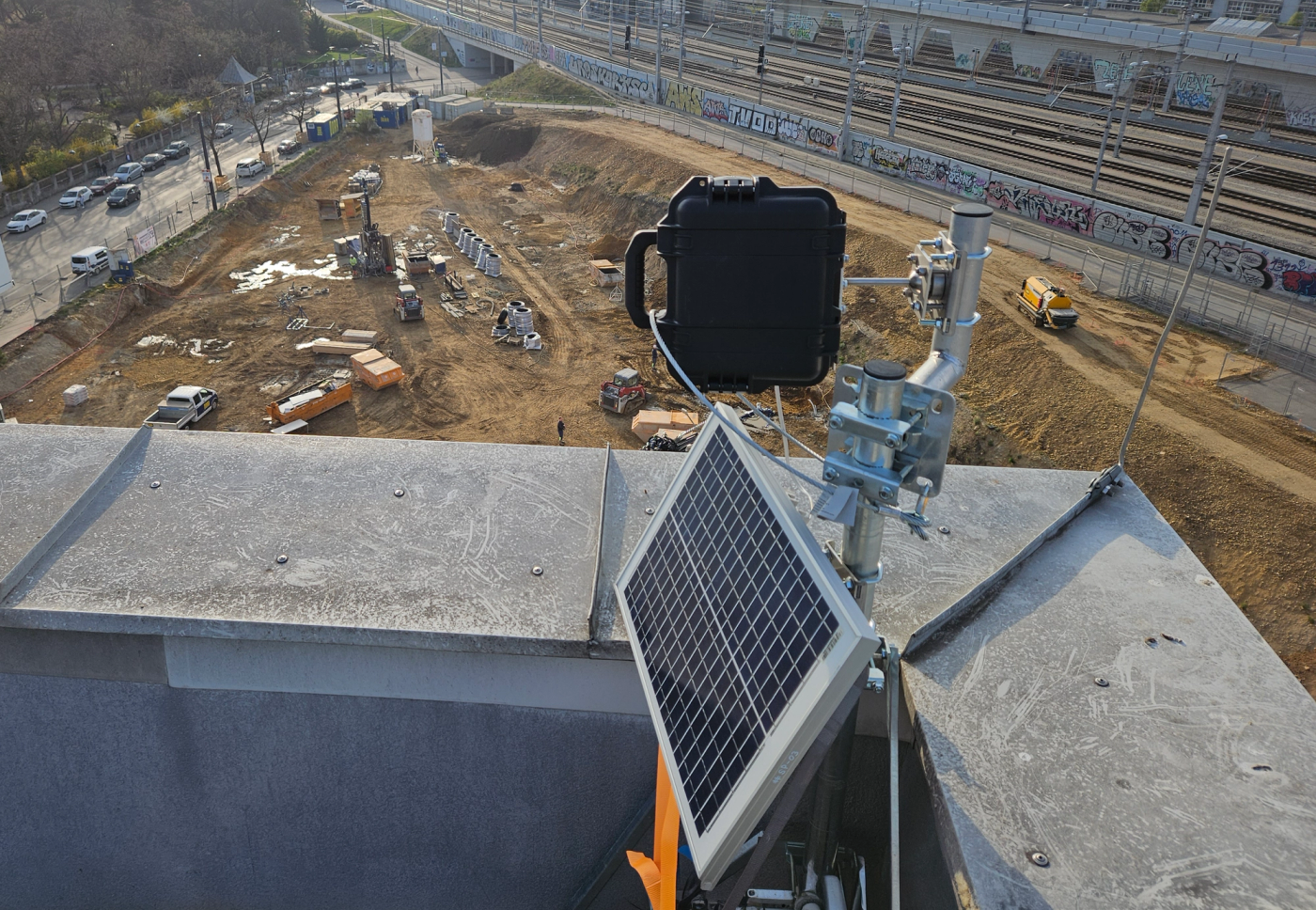
For that reason, teams evaluating camera ftp upload should think beyond the transfer method itself. In most professional environments, FTP is the intake mechanism, while a software layer is needed to organize files, verify continuity, detect gaps and make image data usable across the life of the project. This is the role a platform such as TimelapseRobot can play in a larger long-term workflow.
What camera FTP upload is and how it works
A camera FTP upload setup allows a camera to send image files directly to a remote server using the File Transfer Protocol. In most professional environments, the camera is configured with a server address, username, password, destination path, and upload rule. Once configured, the device captures an image and pushes that file automatically to the remote endpoint.
In long-term documentation workflows, the uploaded file is usually a JPEG snapshot generated at fixed intervals. The camera may send an image every minute, every five minutes, every fifteen minutes, or according to a schedule that matches the pace of the project. The camera creates the image, but the receiving system has to handle storage, structure and later processing.
This is why FTP remains useful in B2B environments. Many professional IP cameras support it natively and it provides a simple export mechanism that can feed a larger cloud-based workflow. If your goal is to turn an IP camera into a construction timelapse system, FTP is often part of that configuration, but it should never be seen as the full solution.
Why many IP cameras support FTP image uploads
Many manufacturers support ip camera ftp upload because it solves a common technical requirement without forcing the camera to depend on a specific cloud platform. A camera only needs to create the file and transfer it to a known destination. Everything after that can be handled by external infrastructure.
That flexibility is important in professional workflows. Construction monitoring providers, system integrators, and infrastructure teams often work across mixed environments. FTP works across these models because it separates image capture from downstream processing.
It also fits the logic of fixed-position IP camera deployments. If you are still evaluating the hardware itself, see our guide to best IP camera construction monitoring for long-term timelapse projects. In many long-term documentation projects, the goal is not continuous live video recording. The goal is predictable still image capture at structured intervals. This is one reason why IP-based systems remain highly relevant when evaluating the best camera for construction timelapse or comparing IP camera vs GoPro timelapse for construction.
How cameras generate and upload image snapshots at intervals
In most long-term deployments, the camera is set to create snapshots on a defined schedule. That schedule may run all day, only during working hours, or according to a project-specific logic. Once the image is created, the camera compresses it, applies its filename pattern and uploads it to the configured destination.
From a technical perspective, this is straightforward. From an operational perspective, it is where many teams become overconfident. A camera that can upload one image successfully in a test environment has not yet proven that it can maintain a complete record over six, twelve, or twenty-four months.
The real challenge is not just generating images. It is making sure that expected images continue to arrive consistently, that gaps become visible quickly and that failures are not discovered only after a milestone has already passed. That is also why FTP-based systems need the same operational mindset as any other long-term GoPro construction timelapse or IP camera deployment.
A cloud workflow such as TimelapseRobot can take the incoming snapshot stream and place it into a structured project timeline, which is far more useful than simply storing files in a folder without context.
File naming conventions and timestamp handling
Why sortable timestamps in filenames are critical
In a real production archive, filenames are still one of the most important parts of the system. In TimelapseRobot, they do not need to include a project reference or camera identifier, because projects and cameras are already defined within the account structure and each camera uses its own FTP credentials. What the filename should preserve clearly is a sortable timestamp such as _YYYYMMDD\_HHMMSS_.
Timestamps in filenames are critical because upload time is not always the same as capture time. A file might arrive late because of a connection issue, but it still needs to be positioned correctly in the sequence. If the actual capture timestamp is not preserved clearly in the filename or structured metadata, downstream systems become less reliable.
Poor timestamp logic creates the same type of archive weakness that often contributes to wider construction timelapse problems.
Organizing image data at scale
Folder structures
A simple flat folder may be acceptable during setup, but it does not scale well once multiple cameras are uploading continuously over several months. In practice, a more useful structure is usually project first, then camera, with each camera keeping one continuous folder of image files.
For timelapse production, this is often the most practical approach because all frames from one camera remain in a single chronological sequence and can move directly into editing or rendering without first being copied out of daily subfolders.
Project separation
Project separation is just as important as folder structure. Companies managing multiple construction or infrastructure sites at the same time need a storage logic that keeps each archive distinct. Without that separation, file collisions, misclassification and access-control problems become much more likely.
This is one of the reasons long-term archive governance matters so much in construction timelapse costs as well. The visible cost is not just the camera or the connection. The real cost also includes the operational structure needed to keep months of incoming files usable and traceable.
A receiving platform can map incoming uploads to the correct project and camera automatically. That is a practical example of how TimelapseRobot fits into an FTP workflow.
From FTP server to cloud workflow
Ingestion pipelines
In a production environment, the FTP server is rarely the final destination. More often, it acts as an intake layer. Files arrive there first and a second system validates them, assigns them to the correct project and camera based on the receiving FTP credentials, checks timestamp logic and transfers them into long-term storage.
This is where upload camera images to cloud becomes more than a camera setting. A strong workflow uses FTP as the delivery method into a controlled ingestion pipeline rather than as the full storage architecture.
That ingestion layer may check whether the filename is valid, whether the timestamp format matches expectations, whether the file size looks plausible and whether duplicate uploads are appearing. In larger deployments, this stage may also generate previews or trigger monitoring alerts if uploads are missing.
Processing and storage
Once files enter the cloud environment, they often go through additional processing. This may include image resizing, metadata extraction, project indexing, preview generation and preparation for later timelapse rendering.
Cloud storage itself is not the workflow. It is the persistence layer inside the workflow. A reliable ftp camera cloud storage system needs a way to receive, organize, validate and later retrieve images efficiently.
An FTP server can receive files, but it does not inherently know whether those files belong to Project A or Project B, whether a camera stopped uploading three hours ago, or whether an expected image sequence contains gaps. A cloud workflow such as TimelapseRobot can sit behind that intake layer and handle organization, monitoring and processing.
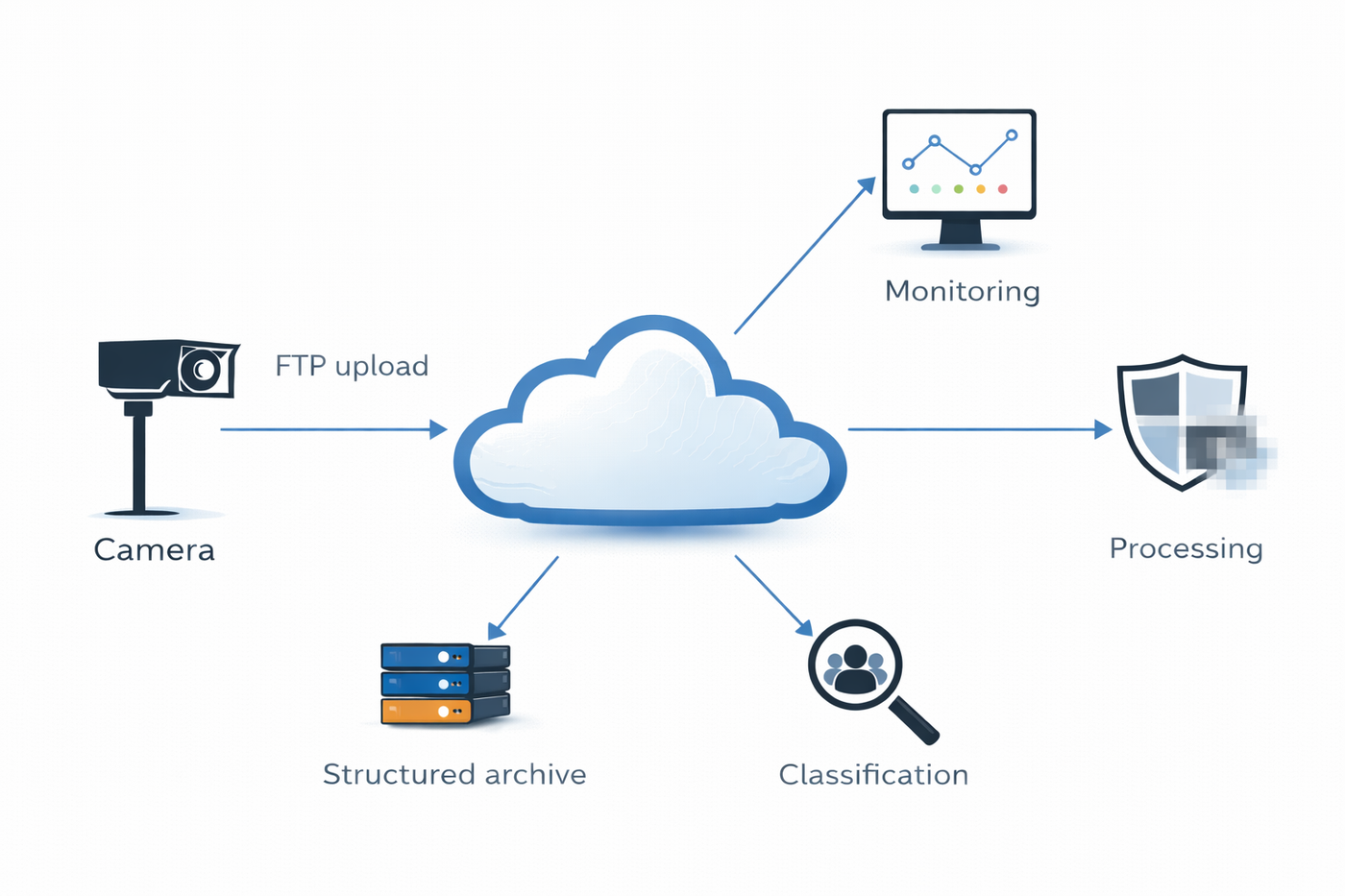
FTP upload is only the intake step.
Common challenges in FTP-based workflows
Missing uploads
Missing uploads are one of the most common issues in long-term projects. The camera may reboot, the network may fail briefly, credentials may expire, or the receiving server may become unavailable. Unless expected uploads are being monitored actively, those gaps may go unnoticed for too long.
Connection failures
FTP connections can fail intermittently because of firewall settings, routing changes, signal instability, DNS issues, or configuration mismatches. In field deployments, these failures are often intermittent rather than permanent, which makes them harder to spot without active monitoring.
Inconsistent file naming
Naming patterns often break when a camera is replaced, firmware is updated, or different device models are mixed in one deployment. Even small variations can affect downstream automation if the system expects a specific pattern.
These are the kinds of operational issues that lead directly to construction timelapse problems in real projects.
Reliability considerations for long-term projects
Long-term projects expose weaknesses that short tests do not reveal. A workflow may seem stable for a few days and still fail after several months because of changing site conditions, storage growth, time drift, power instability, weather exposure, or unnoticed upload interruptions.
Power reliability is one of the clearest examples. If the camera loses power unpredictably, the FTP workflow becomes irrelevant because no file is created in the first place. That is why timelapse camera power supply planning is not a separate topic from FTP.
Environmental protection matters in the same way. Dust, moisture, heat, condensation and poor cable entry design all affect whether an outdoor system remains stable. For that reason, any serious FTP-based setup that uses an outdoor timelapse camera should treat enclosure design, sealing, mounting, and cable management as part of the same reliability model.
Camera category also affects the workflow. Some projects are a better match for fixed IP cameras with scheduled snapshots and network-based delivery. Others may benefit from a different approach depending on framing flexibility, mounting constraints, or image priorities. That is where a comparison such as IP camera vs GoPro timelapse for construction becomes useful.
Best practices for large-scale image ingestion in multi-month deployments
The strongest long-term systems treat FTP as the first mile, not the full solution. Cameras should upload into a controlled intake layer where timestamps, file integrity and camera assignment are validated before files are committed to the long-term archive.
Naming conventions should be standardized early. Folder structures should support real post production. Monitoring should not only confirm that a server is reachable, but also that expected images are arriving at the expected intervals. In professional systems, absence must be visible.
Teams should also think about image retrieval from the beginning. Who needs access to the files? How quickly? In what format? For preview, reporting, client review, and final timelapse production, the usefulness of the archive depends on how well it was structured at intake.
Budget planning matters too. Once a company moves from a simple test setup into a real multi-site workflow, costs shift from hardware alone to operations: ingestion logic, cloud storage, monitoring, connectivity, and support. That broader view is essential when thinking about construction timelapse costs.
For many teams, this leads to a simple conclusion. FTP is still highly useful because it is widely supported and easy to configure on professional cameras. But the real long-term value comes from the system behind the upload. When incoming files are organized by project and camera, checked for continuity, surfaced to users through a cloud interface and prepared for later reporting or video generation, the workflow becomes much more robust. That is the point where a platform such as TimelapseRobot becomes relevant in an informative rather than promotional way.
In the end, camera FTP upload remains highly useful for construction and infrastructure documentation. It is widely supported, technically simple and well suited to interval-based image capture. But it is only one part of a dependable long-term system. Proper organization, monitoring, power design, environmental protection, and cloud-side processing are what turn basic upload into a trustworthy visual archive.
Frequently asked questions
- How do I set up FTP upload on an IP camera?
- In most professional cameras you enter a server address, username, password, destination path, and an upload rule. Once configured, the camera captures an image on its schedule, compresses it, applies its filename pattern, and pushes the file automatically to the remote endpoint. The camera only creates and transfers the image; storage, structure, and later processing are handled by the receiving system.
- What upload interval should my camera use for FTP snapshots?
- In long-term documentation workflows, cameras typically send a JPEG snapshot at fixed intervals, for example every minute, every five minutes, or every fifteen minutes. The schedule can run all day, only during working hours, or follow project-specific logic. The right interval should match the pace of the project rather than a default setting, and it can be adjusted as project phases change.
- Do uploaded image filenames need a timestamp?
- Yes. Filenames should preserve a sortable capture timestamp such as YYYYMMDD_HHMMSS, because upload time is not always the same as capture time. A file that arrives late due to a connection issue still needs to be placed correctly in the sequence. In TimelapseRobot, filenames need no project or camera identifier, since each camera uses its own FTP credentials and is already mapped in the account.
- Is an FTP server enough for long-term timelapse storage?
- No. An FTP server can receive files, but it does not know which project they belong to, whether a camera stopped uploading hours ago, or whether the image sequence has gaps. In production environments, FTP acts as an intake layer, while a second system validates files, assigns them to the correct project and camera, checks timestamps, and moves them into long-term storage. A cloud workflow such as TimelapseRobot handles that organization, monitoring, and processing.
- Why do camera FTP uploads fail or go missing?
- Common causes include camera reboots, brief network failures, expired credentials, an unavailable receiving server, firewall settings, routing changes, signal instability, and DNS or configuration mismatches. In field deployments these failures are often intermittent rather than permanent, which makes them hard to spot. Without active monitoring of expected uploads, gaps can go unnoticed until after an important project milestone has already passed.
- How should I organize folders when several cameras upload at once?
- A flat folder does not scale once multiple cameras upload continuously for months. A practical structure is project first, then camera, with each camera keeping one continuous chronological folder of images. That way all frames from a camera stay in a single sequence ready for editing or rendering. Clear project separation also prevents file collisions, misclassification, and access-control problems across sites.
Planning a long-term construction timelapse?
Discover the system built for multi-month and multi-year construction deployments.
Explore the Construction Timelapse SystemConnect your own camera
Turn your FTP/IP camera into a timelapse system — start for free.
Step-by-step setup guides: Reolink RLC-510WA · Bixion


